SOFTWARES

SOFTWARES

Download Xara Designer Pro+ 24.2.0.69846 full license

Download Xara Designer Pro+ 24.2.0.69846 full license

Link download Xara Designer Pro+ 24.2.0.69846 full activated

Working with Xara Designer Pro+ 24.2.0.69846 full

Xara Designer Pro+ 24.2.0.69846 x64 full

Working-with-Xara-Designer-Pro-24-2-0-69846-full

Working with Xara Designer Pro+ 24.2.0.69846 full

Description: Quite simply the world’s fastest graphics software. Powerful illustration tools, innovative photo editing, flexible page layout and unrivalled WYSIWYG web design. A single application for all your creative work. Xara Designer Pro is our flagship product and includes all the illustration, photo editing, DTP and web design features of Photo & Graphic Designer, Web Designer Premium and Page & Layout Designer.
Features of Xara Designer Pro+ 24.2.0.69846:
Easy to use and high speed in website design
Having all the necessary facilities for website design
Complete freedom in design, based on drag and drop
WYSIWYG means that everything you see will be the final output of the work
Guaranteed design quality and high compliance with today’s standards
Compatible with all browsers
Suitable design for mobile devices
Having many ready templates
Cloud capabilities for website testing
Various widgets to add to the website, such as YouTube, Google Maps, Facebook, Flickr, etc.
Ability to add video, song, pdf and…
Publishing a website with one click on a free 500 MB host
Site optimization for search engines – implementation of SEO techniques to improve site ranking in search engines
Responsive design to have the best display in different display settings
The possibility of creating different custom templates
The possibility of rapid website prototyping before its detailed and detailed design
Various animations and effects for different parts of the design
Support flash and gif animations
Advanced graphics capabilities to change the graphics of various elements
If you want to download Xara Designer Pro+ 24.2.0.69846 full license, please click to DOWNLOAD symbol and complete check out a little help my website is maintained. The download link is appeared automatically when you complete check out.
CLICKDOWN.ORG Download CAD CAM CNC software
Please see youtube video for download instruction by open *.txt file and copy youtube video link paste to your browser If you don’t know how to download.
Inside folder Xara Designer Pro+ 24.2.0.69846, already have crack’s file and instruction how to install Xara Designer Pro+ 24.2.0.69846 step by step. I guarantee you can install Xara Designer Pro+ 24.2.0.69846 successfully if you follow that instruction.
If you also can not install it or any problems, please contact to me by email: clickdown.org@gmail.com, then I will help you to install software by teamviewer.
Thanks a lot

SOFTWARES

Download OpenSite Designer 2023 v23.00.00.129 x64 full

Download OpenSite Designer 2023 v23.00.00.129 x64 full

Link download OpenSite Designer 2023 v23.00.00.129 win64 full

Working with OpenSite Designer 2023 v23.00.00.129 full license

Working with OpenSite Designer 2023 v23.00.00.129 full license

Description: OpenSite Designer 2023 v23.00.00.129 that performs a wide range of complex tasks such as parking configuration, financial risk analysis of land works, residential design, handicap parking and access, site development, sanitary and storm network design, and generation of construction reports. . OpenSite Designer blends traditional engineering workflows for schedule, specifications and earthworks with 3D parametric modeling and fieldwork optimization to enable model-driven creation of all design deliverables. OpenSite Designer enables users to create intelligent geometries and 3D models containing site information, terrain data, parking, building pads, driveways, sidewalks, parcel layouts, and related site features.
OpenSite Designer provides a comprehensive modeling environment and addresses all phases of project delivery. It provides a number of applications to meet the demands of each stage of the project life cycle. Designs created in Designer OpenSite benefit from BIM Review via Navigator, in Office, Field and Site. Navigator not only enables visualization and review of 3D designs, but also uses situational vision.
If you want to download OpenSite Designer 2023 v23.00.00.129 full license, please click to DOWNLOAD symbol and complete check out a little help my website is maintained. The download link is appeared automatically when you complete check out.
CLICKDOWN.ORG Download CAD CAM CNC software
Please see youtube video for download instruction by open *.txt file and copy youtube video link paste to your browser If you don’t know how to download.
Inside folder OpenSite Designer 2023 v23.00.00.129, already have crack’s file and instruction how to install OpenSite Designer 2023 v23.00.00.129 step by step. I guarantee you can install OpenSite Designer 2023 v23.00.00.129 successfully if you follow that instruction.
If you also can not install it or any problems, please contact to me by email: clickdown.org@gmail.com, then I will help you to install software by teamviewer.
Thanks a lot

SOFTWARES

Download Adobe Photoshop 2024 v25.11.0.706 full license

Download Adobe Photoshop 2024 v25.11.0.706 full license

Link download Adobe Photoshop 2024 v25.11.0.706 full activated

Working with Adobe Photoshop 2024 v25.11.0.706 full license

Working with Adobe Photoshop 2024 v25.11.0.706 full license

The description: Adobe Photoshop 2024 v25.11.0.706 is a new version of the program for processing raster graphics. Many graphic formats are supported.
Adobe Photoshop allows you to create new images and edit them. Photoshop is used to create photorealistic images, to work with colored scanned images, for retouching, color correction, collage, graphic transformation, color distribution, etc. Adobe Photoshop has all methods of working with point images, while it has the ability to work with layers and uses outlines. Adobe Photoshop provides all the necessary tools for correction, installation, preparation of images for printing and high-quality output.
Features of Adobe Photoshop 2024 v25.11.0.706
Frame Tool for easy masking
Content-Aware Fill reimagined
New multiple undo mode
Usability improvements
Transform proportionally by default
Prevent accidental panel moves with Lock Workspace
Live blend mode preview
Symmetry mode
Color Wheel to choose colors
Improved in-app learning
Preference to increase UI size
Support for Southeast Asian scripts
Modernized compositing engine
Note: Artificial intelligence (Firefly AI) is currently disabled for most of the fluff versions and can only be used for legitimate accounts. You can use the free online version ( Firefly.adobe.com ). To use, you must login to the site.
If you want to download Adobe Photoshop 2024 v25.11.0.706 full license, please click to DOWNLOAD symbol and complete check out a little help my website is maintained. The download link is appeared automatically when you complete check out.
CLICKDOWN.ORG Download CAD CAM CNC software
Please see youtube video for download instruction by open *.txt file and copy youtube video link paste to your browser If you don’t know how to download.
Inside folder Adobe Photoshop 2024 v25.11.0.706, already have crack’s file and instruction how to install Adobe Photoshop 2024 v25.11.0.706 step by step. I guarantee you can install Adobe Photoshop 2024 v25.11.0.706 successfully if you follow that instruction.
If you also can not install it or any problems, please contact to me by email: clickdown.org@gmail.com, then I will help you to install software by teamviewer.
Thanks a lot

SOFTWARES

Download vectric Aspire 11.016 full license

Download vectric Aspire 11.016 full license

Link download vectric Aspire 11.016 full activated

Working with vectric Aspire 11.016 full license

Working with vectric Aspire 11.016 full license

The Discharge: 32bit
Interface language: Russian + English
System requirements: Windows 7 and above

The description: vectric Aspire 11.016 provides a powerful but intuitive software solution for creating and cutting parts on CNC milling machine. There are tools for 2D design and calculation of 2D trajectories, such as profiling, pocket cutting and drilling, as well as 2.5D trajectories, including; V-carvings, prism carving, grooving, grooving, chamfer trajectory and even decorative texture strategy. What makes it a premium package is the added 3D design tools that allow you to create your own 3D relief models and process them with 3D processing strategies. Aspire’s unique 3D modeling tools combined with an exhaustive set of 2D design and editing tools make it easier to create your own 2D and 3D parts from scratch, as well as the ability to import and edit external 2D and 3D data.

vectric Aspire 11.016 features
Aspire’s single user interface for designing and machining 3D parts makes it easy and rational to design and build 3D part models, as well as calculate 2D and 3D toolpath combinations for machining high-quality projects.
Emphasis on ease of use not only includes the software’s user interface and workflow, but is also included in the training materials. Aspire comes with over 90 hours of training based on real-world examples covering all aspects of using the program. The videos come with associated files that allow users to watch and practice the tutorials at their own pace.
Aspire has a unique interactive approach to assembling 3D part models that makes it easy to change the shape and properties of individual parts and create complex designs using simple sets of 3D shapes. Flexible design tools allow various components to be edited (moved, scaled, measured, rotated, tilted, faded, and morphed) at any time without having to rebuild the component.
Comprehensive set of 3D modeling tools
If you want to download vectric Aspire 11.016 full license, please click to DOWNLOAD symbol and complete check out a little help my website is maintained. The download link is appeared automatically when you complete check out.
CLICKDOWN.ORG Download CAD CAM CNC software
Please see youtube video for download instruction by open *.txt file and copy youtube video link paste to your browser If you don’t know how to download.
Inside folder vectric Aspire 11.016, already have crack’s file and instruction how to install vectric Aspire 11.016 step by step. I guarantee you can install vectric Aspire 11.016 successfully if you follow that instruction.
If you also can not install it or any problems, please contact to me by email: clickdown.org@gmail.com, then I will help you to install software by teamviewer.
Thanks a lot

SOFTWARES

Download Altium Designer 24.7.2 Build 38 x64 full license

Download Altium Designer 24.7.2 Build 38 x64 full license

Link download Altium Designer 24.7.2 Build 38 win64 full activated

Altium Designer 24.7.2.38 x64 full license

Altium Designer 24.7.2.38 x64 full license

Working with Altium Designer 24.7.2.38 full activated

Working with Altium Designer 24.7.2.38 full activated

The Discharge: 64bit
Interface language: English
System requirements: Windows 11 (64-bit only) or Windows 10 (64-bit only)
Description: Integrated computer-aided design (CAD) system of electronic means developed by the Australian company Altium. Previously, the company developed CAD P-CAD, which gained extraordinary popularity among Russian PCB developers. Altium Designer is a powerful system that allows you to implement electronic projects at the schematic level or program code, followed by the transfer of information to FPGA or printed circuit board. A distinctive feature of the program is the design structure and end-to-end integrity of development at different levels of design. In other words, changes in the development at the board level can be instantly transferred to the FPGA or circuit level and also back. As a priority area of developers of this program, it is worth noting the integration of ECAD and MCAD systems. Now the development of the PCB is possible in three-dimensional form with bidirectional transfer of information to mechanical CAD (Solid Works, Pro/ENGINEER, etc.)
Features of Altium Designer 24.7.2
Analyzing the similar circuits using Spice.
Have the perfect tool with the ability to simulate and debug the code and design FPGA VHDL.
The ability to form three-dimensional circuits.
3D measurements such as Solid Work
Create outputs, drawing as these drawings professional technical
Strong support the design of automation
If you want to download Altium Designer 24.7.2 full license, please click to DOWNLOAD symbol and complete check out a little help my website is maintained. The download link is appeared automatically when you complete check out.
CLICKDOWN.ORG Download CAD CAM CNC software
Please see youtube video for download instruction by open *.txt file and copy youtube video link paste to your browser If you don’t know how to download.
Inside folder Altium Designer 24.7.2, already have crack’s file and instruction how to install Altium Designer 24.7.2 step by step. I guarantee you can install Altium Designer 24.7.2 successfully if you follow that instruction.
If you also can not install it or any problems, please contact to me by email: clickdown.org@gmail.com, then I will help you to install software by teamviewer.
Thanks a lot

SOFTWARES

Download NewTek LightWave 3D 2024.0 x64 full license

Download NewTek LightWave 3D 2024.0 x64 full license

Link download NewTek LightWave 3D 2024.0 win64 full activated

New-Tek-Light-Wave-3-D-2024-0-x64-full

NewTek LightWave 3D 2024.0 x64 full

Working-with-New-Tek-Light-Wave-3-D-2024-0-full

Working with NewTek LightWave 3D 2024.0 full

Description: NewTek LightWave 3D 2024.0 is a comprehensive 3D modeling, animation, and rendering software developed by NewTek. It is widely used in the fields of film and television production, motion graphics, game development, and architectural visualization. LightWave 3D offers a range of powerful features, including advanced modeling tools, realistic rendering capabilities, and a versatile animation system.

The software’s flexibility and integration with other industry-standard tools make it a popular choice for professionals seeking to create stunning visual content. With its long-standing presence in the industry, LightWave 3D continues to be a go-to solution for 3D content creation and continues to evolve with the latest technological advancements.
Features

Instancing

Instancing lets you create mass duplication of objects in a scene, with very little overhead. Previously, you would simply run out of memory. Now, with the ability to have huge ‘virtual’ polygon counts, artists can populate their scenes with incredible detail, and yet retain reasonable render times.

While instances can be thought of as clones of the original source objects, they don’t need to look identical. They can be randomly scaled, positioned, rotated and even surfaced completely different from the source. This means you can use instancing for any number of uses.

Flocking

Use the Flock controller, which calculates crowd avoidance of neighbors, target alignment, and cohesive attractions, to create realistic natural motions, with ease. These are the three elements of any flocking system.

Classic examples of flocking motion are:

Flocks of Birds
Schools of Fish
Swarms of Insects
Animal Herd Behaviors
Craft Maneuvers (planes, alien ships, etc)

Fracture

This new Modeler tool was designed specifically to compliment Bullet dynamics in LightWave Layout. It allows the artist to pre-fracture objects ready for destruction.

There are a number of different methods and associated settings to fine tune the look of the pieces as they are broken up. You also have the ability to create an Endomorph of the resulting fracture, which means you can animate the explosion, with or without using dynamics.

Weight maps can also be applied to the source object to control the density of where the fracturing takes place, making Fracture a flexible tool for creating breaking objects in LightWave.

Bullet Dynamics

Bullet is a fast, production proven, open source physics engine that is used in many high profile, effects-driven films and real-time game engines. Bullet features 3D rigid body dynamics originally created by Erwin Coumans.

LightWave 11 features the Bullet dynamics engine directly in Layout so that it can be used with the new Fracture tool in Modeler to create compelling physics-based animation. Things like collapsing buildings, explosions, and even natural placement of items in a random pattern, would otherwise be difficult to do by hand.

Virtual Studio Tools

The Virtual Studio Tools first made an appearance in LightWave 10, as a way of using third party controllers to animate items in your scene.

LightWave 11 continues to expand on this concept by allowing more controller types, such as the affordable Playstation Move. These third party controllers use the new SDK available for the Virtual Studio Tools, which now allows developers to hook into the system directly.

Using the new Control Booth and Device Managers in VST, users can now manage every aspect of how their controllers are configured, and how they are used within LightWave. Essentially, anything that can be animated in LightWave can be controlled, using any device.

It is also now possible to modify how the data input is manipulated as it is captured into LightWave, using the Node Editor. This allows for complex logic to affect the input. Once a virtual performance is captured, the data can be edited in the Graph Editor, letting you hand edit any live-captured performances.

Virtual Studio Tools in LightWave 11 is a significant evolution of this technology, and with the new SDK, third party developers can extend and enhance it even further.

Interchange Tools

GoZ is an interchange technology from Pixologic that allows applications to send model and texture data to and from ZBrush for sculpting detail on a base mesh. It has proved incredibly popular among many 3D artists. Now, LightWave 11 brings that technology to you.

The GoZ implementation in LightWave Layout and Modeler is robust and fully featured. It allows you to exchange model data, along with all the associated texture maps. The Modeler implementation even lets you use ZBrush for sculpting Endomorphs for things like facial morphs.

GoZ now allows LightWave to be even more integrated within studio pipelines, making it a great addition to the LightWave 11 toolset.

Render Buffer Enhancements

Saving and viewing the various buffers produced by the render engine to make up an image, is now more powerful and much easier in LightWave 11.

The new Compositing Buffer Export panel now makes it possible to select which objects are to be included with the buffers you specify, and easier to select which buffers are to be exposed for saving or viewing.

This makes rendering out for compositing much more streamlined, as it combines and extends the functionality of two different panels you had to visit in previous versions of LightWave. It also allows saving of presets for the commonly used buffers to aid in setting up for output, something that was not possible before.

Python Scripting

Python is an industry standard programming language prevalent in most CG pipelines. The inclusion of Python in LightWave 11 allows even further integration of LightWave into studio pipelines, as those familiar with Python can quickly begin writing tools for LightWave.

FiberFX Enhancements

FiberFX now has a new volume rendering mode. “Stroke” is the original shading method for volumetric rendering. When set to “Solid,” the user can apply shading and material like any normal surface. This lets you create very complex looking fibers, easily, and perform parametric cylinder rendering of the fibers.

FiberFX volumetric rendering has also been enhanced with smooth line rendering to match the pixel filter look, as well as render buffer support for all fiber types.

New optimizations that make the building and relaxed distribution of fibers multi-threaded, give you faster render times and interactivity when working with fiber setup and styling. Additionally, the FiberFX instance accelerator demonstrates benchmarked rendering improvements of 2x for complex situations.

FiberFX has also benefited from the new instancing system in LightWave 11. Volume mode now uses the new built-in instancing system. The old FiberFX Instancing Tab is no longer needed and has been removed.

FiberFX has also been given enhanced nodal support in the following areas:

Instance Info node now works to change color on FiberFX instances in Solid volume type
Added support for nodal color input to the stroke or ribbon type of volume rendering
Add nodal color UV texture mapping support for volume stroke rendering, including smoothing
Add nodal color UV texture mapping support for rasterized fibers, including smoothing
Add alpha input into FiberFX node editor
Add alpha mapping support for texture mapping

User Interface

Search

The list of available nodes can now be searched to find a specific node more quickly. There are also options for case-sensitive searching and flat list results (the matched nodes will appear in a flat list as opposed to a hierarchal list showing the node group they are located in). There is also a quick option to clear out a search and get back to the full list. All of these options are found in the popup menu to the right of the search field.

Adding Multiple Nodes

The addition of the node tree list means that multiple nodes can be added all at once, rather than one at a time. Simply select the nodes you need and click the Add Node button. Alternatively, click the first node, hold the Shift or Ctrl key (depending on the type of selection you are doing – contiguous/non-contiguous), and double-click the last node. The previous way of adding nodes via the popup menu is also still available. The small drop down arrow next to the Add Node button is where the original node menu is located.

Many options that affect the final render are located in a number of panels. Previously the user had to switch panels often to check all of these settings. In LightWave 11, the main panels have been grouped together for quick access within the same panel.

The Render Properties panel now hosts the Camera and Light options. The shortcuts for opening these panels are still the same as in previous versions of LightWave, so your workflow will not be disrupted. But checking your render settings is now much easier with all these items in one panel, under their respective tabs. The Render Properties panel can now also be accessed by the shortcut Ctrl p.

Faster Access to the Morph Mixer Interface

The Morph Mixer plug-in is especially important for character animators, but was buried away in a large list of plug-ins. On the Object Properties panel under the ‘Deform’ tab, there is now a button to quickly add and access the Morph Mixer interface.

IK Evaluation Optimizations

Performance has been improved for the IK rigs to speed up character animation, allowing for easier and smoother posing while working. Also GLSL speed in Layout is improved.

Scene Loading Speed Optimizations

A huge speed boost has been added to Scene and Object loading, in some cases – 7x faster.

Modeler Optimizations & Enhancements

Multi-Layered Object is now much faster to work with than previous versions of Modeler.

Off-Axis Alignment

Items can now be modeled off-axis and automatically aligned to the origin. This allows details to be added, such as bolts or nurnies to be placed and aligned to a complex surface.

Shadow Catcher Node Material

Shadow Catcher allows comping of shadows and even reflections onto a background plate by rendering to an object that is modeled to match the ‘real’ ground in the background. The Shadow Catcher node then only renders the shadows and reflections of other scene items, while ignoring the ground model surface. The result is believable, perfectly blended shadows and reflections in the background plate, just as if the CG elements were actually in the original photo.

Print Render Utility

Working out how big to make your camera frame size for print has long been a question asked by many. And while the math is simple, its process is ripe for automation. The ‘Print Assistant’ utility in LightWave has been replaced with a much more fully featured version. This version supports all major print units and has a large list of preset standard paper sizes, making it a useful update for those working with LightWave for print.

Unified Sampling

The sampling of anti-aliasing, shaders, and lights has undergone a significant change to a more advanced unified sampling system. The result means better quality sampling, often at lower render times.

The new system results in changes to the anti-aliasing, with ‘Samples’ and ‘Quality’ settings located around the interface. They are all now using absolute samples and are located in only two places: the Camera and Render Globals panels. Previously light quality was calculated as a squared value. For example, if the user entered a value of 4, the actual number of samples taken would be 4×4, which equals 16.

Nodes handled things slightly different, they would try to get as close to the absolute number of samples entered, but sometimes might not be able to. These areas are now on equal footing, which means they work together for a better image quality.

VPR Enhancements

VPR now allows the ability to select a surface by clicking on the object in the viewport, which then brings up the surface editor with the surface highlighted. This new functionality makes it much easier to make modifications to surfaces. Lens Flares are now supported directly in the VPR, also the unified sampling updates are also present in the VPR which give improved quality.

HyperVoxels Blending

The Metaball blending method for HyperVoxels has been re-implemented and can be used with all HyperVoxel types. Rather than just retaining the two former preset choices (Metaballs 1 and Metaballs 2) the implementation has been revised to allow for control of the algorithm via a percentage entry field and animation of the value using Envelopes and Textures.

OBJ I/O Enhancements

The OBJ file format is now more robust, supports a wider range of material tags, and loads faster to optimize I/O with other external applications.
If you want to download NewTek LightWave 3D 2024.0 full license, please click to DOWNLOAD symbol and complete check out a little help my website is maintained. The download link is appeared automatically when you complete check out.
CLICKDOWN.ORG Download CAD CAM CNC software
Please see youtube video for download instruction by open *.txt file and copy youtube video link paste to your browser If you don’t know how to download.
Inside folder NewTek LightWave 3D 2024.0, already have crack’s file and instruction how to install NewTek LightWave 3D 2024.0 step by step. I guarantee you can install NewTek LightWave 3D 2024.0 successfully if you follow that instruction.
If you also can not install it or any problems, please contact to me by email: clickdown.org@gmail.com, then I will help you to install software by teamviewer.
Thanks a lot
SOFTWARES

Download Siemens NX 2306 Build 9120 win64 full license

Download Siemens NX 2306 Build 9120 win64 full license

Link download Siemens NX 2306 Build 9120 x64 full activated

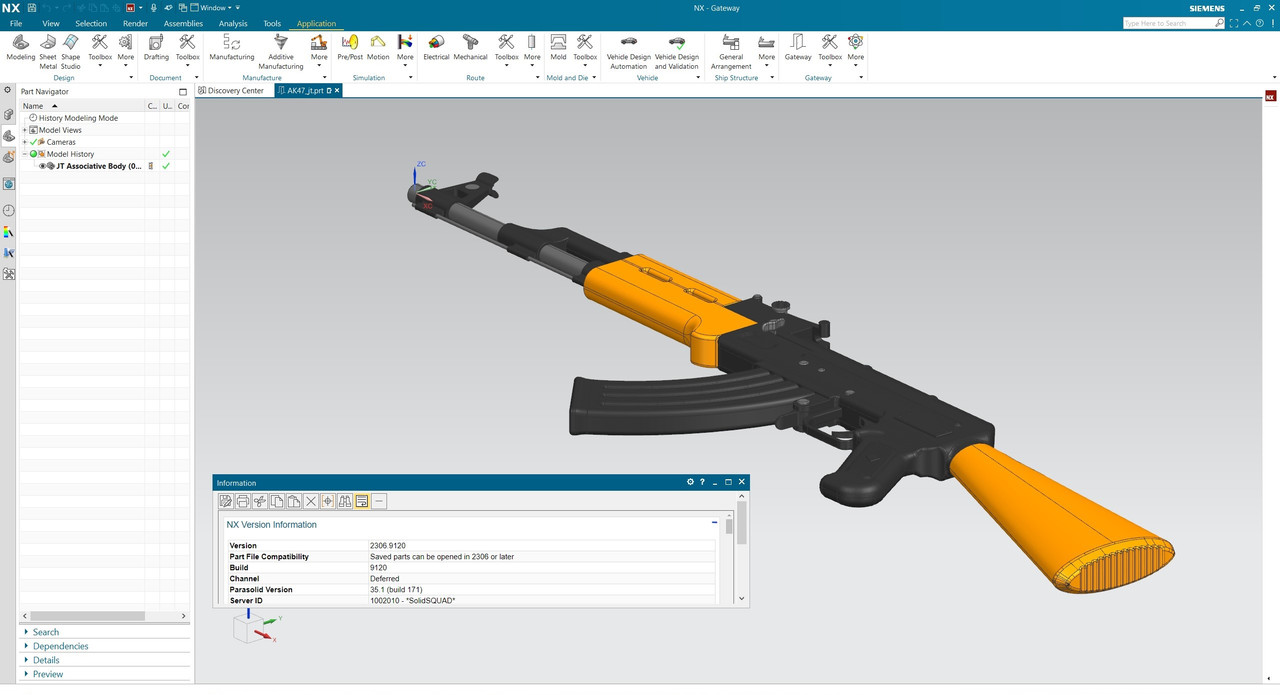
Working with Siemens NX 2306 Build 9120 full

Working with Siemens NX 2306 Build 9120 full

System Requirements and Technical Details:
64-bit Windows 7 or Windows 11 operating system.
4 GB RAM minimum, 8 GB or 16 GB RAM recommended.
True Color (32-bit) or 16 million colors (24-bit)
Screen Resolution: 1280 x 1024 or higher, widescreen format.
Languages : Multilingual
Version : 2306 Build 8101
The Discharge: 64bit
Interface language: Multilingual
Description: Siemens NX 2306 Build 9120 supports every aspect of product development, from concept design to engineering and manufacturing; this program gives you an integrated toolset that coordinates disciplines, preserves data integrity and design intent, and streamlines the entire process.
The industry’s most powerful, flexible, and innovative product development solution, this program for Design has the features, performance, and capabilities to help you get the product to market faster than ever before.
Program CNC machine tools, control robotic cells, drive 3D printers, and monitor quality using one software system. Digitally transform your part manufacturing business to gain productivity and increase profitability.

Digitally transform part manufacturing using one integrated software system to program CNC machine tools, control robotic cells, drive 3D printers, and monitor product quality.

Siemens PLM Software has released the first maintenance pack of PLM NX 12 software, a major release with significant new functionality in all product areas. With NX 12, it is still finding areas for innovation to enhance an already breathtakingly mature system.
Description of Siemens NX 2306 Build 9120
NX for Design
NX for Manufacturing
Syncrofit
Fibersim
Mastertrim
Catchbook
If you want to download Siemens NX 2306 Build 9120 full license, please click to DOWNLOAD symbol and complete check out a little help my website is maintained. The download link is appeared automatically when you complete check out.
CLICKDOWN.ORG Download CAD CAM CNC software
Please see youtube video for download instruction by open *.txt file and copy youtube video link paste to your browser If you don’t know how to download.
Inside folder Siemens NX 2306 Build 9120, already have crack’s file and instruction how to install Siemens NX 2306 Build 9120 step by step. I guarantee you can install Siemens NX 2306 Build 9120 successfully if you follow that instruction.
If you also can not install it or any problems, please contact to me by email: clickdown.org@gmail.com, then I will help you to install software by teamviewer.
Thanks a lot

SOFTWARES

Download PVsyst 7.4.8 full license 100% working forever

Download PVsyst 7.4.8 full license 100% working forever

Link download PVsyst 7.4.8 full activated lifetime

Working with PVsyst 7.4.8 full license

Working with PVsyst 7.4.8 full license

Description: PVsyst 7.4.8 is a PC software package for the study, sizing and data analysis of complete PV systems.
It deals with grid-connected, stand-alone, pumping and DC-grid (public transportation) PV systems, and includes extensive meteo and PV systems components databases, as well as general solar energy tools.
This software is geared to the needs of architects, engineers, researchers. It is also very helpful for educational training.
PVsyst 7.4.8 focuses on complete and precise PV system study with a complete set of tools:
New Features
Meteo import: possibility to import 3E TMY hourly data in Import in known format
Optimizer: implemented Sungrow optimizers, with sizing constraints (inverters allowed, limits on the number in series, etc.) and update of the help
Trackers: wind stow position for tilted axis and horizontal North-South trackers.
Features and Highlights
Comprehensive design tool for evaluating photovoltaic systems of all sizes.
Compile a detailed evaluation of the effectiveness of your PV platform. Detailed computation of PV conversion effectiveness.
Simulation of sun/shadow for your PV system, including placement on structures and precise location/orientation.
Build-in support for location searching via Google Maps and Meteonorm interpolation.
Direct shading simulation calculation takes into consideration the effects of nearby big plants.
Tools for parameter optimization.
Optimized for Windows 7, 10 and windows 11. It can be used in Windows 8/8.1 via virtual machines.
If you want to download PVsyst 7.4.8 full license, please click to DOWNLOAD symbol and complete check out a little help my website is maintained. The download link is appeared automatically when you complete check out.
CLICKDOWN.ORG Download CAD CAM CNC software
Please see youtube video for download instruction by open *.txt file and copy youtube video link paste to your browser If you don’t know how to download.
Inside folder PVsyst 7.4.8, already have crack’s file and instruction how to install PVsyst 7.4.8 step by step. I guarantee you can install PVsyst 7.4.8 successfully if you follow that instruction.
If you also can not install it or any problems, please contact to me by email: clickdown.org@gmail.com, then I will help you to install software by teamviewer.
Thanks a lot

SOFTWARES

Download Cortona3D RapidAuthor 14.2 + RapidDeveloper 13.1 + RapidDataConverter 13.0

Download Cortona3D RapidAuthor 14.2 + RapidDeveloper 13.1 + RapidDataConverter 13.0

Link download Cortona3D RapidAuthor 14.2 full license

Link download Cortona3D RapidDeveloper 13.1 full license

Link download Cortona3D RapidDataConverter 13.0 full license

Cortona3D RapidAuthor 14.2 + RapidDeveloper 13.1 + RapidDataConverter 13.0 full

Cortona3D RapidAuthor 14.2 + RapidDeveloper 13.1 + RapidDataConverter 13.0 full

Cortona3D RapidAuthor 14.2 + RapidDeveloper 13.1 + RapidDataConverter 13.0 full license

Cortona3D RapidAuthor 14.2 + RapidDeveloper 13.1 + RapidDataConverter 13.0 full license

Working with RapidDeveloper 13.1 + RapidDataConverter 13.0

Working with RapidDeveloper 13.1 + RapidDataConverter 13.0

Working with Cortona3D RapidAuthor 14.2 + RapidDeveloper 13.1 + RapidDataConverter 13.0

Working with Cortona3D RapidAuthor 14.2 + RapidDeveloper 13.1 + RapidDataConverter 13.0

The Discharge: 64bit
Interface language: Multilingual
System requirements: Standard

The description: Availability of high-quality documentation for products is one of the most important factors that ensure the success of the company and the efficient work of its customers, partners and employees. Cortona3D offers an effective toolkit for the development of interactive 3D/2D catalogs of parts, maintenance and repair manuals, training courses.
RapidAuthor significantly reduces the time and cost of developing documentation through the use of existing CAD-, PDM- and ERP data and the creation of a unified environment for the preparation of 2D/3D graphics and text descriptions.
RapidManual is a software product for the creation of three-dimensional interactive technical manuals for repair equipment, maintenance, assembly/disassembly of equipment. The use of three-dimensional animations allows you to visually explain complex technical procedures and increase the level of memorability of information. Due to this, the number of personnel’s errors when working with complex expensive equipment and the downtime of equipment due to breakdowns decreases. More details…
RapidCatalog is an effective tool for creating 3D/2D parts catalogs. The high degree of interactivity and clarity of the catalog allows you to reduce the number of requests to the support service and prevent errors when ordering spare parts. The creation of parts catalogs begins at the design stage of the product, which significantly accelerates the production of the product to the market.
RapidLearning
RapidLearning offers an effective way to create training courses for training staff to work with complex equipment. The presence of interactive 3D elements in the training significantly increases the level of memorability of complex operations, while the degree of visibility of 3D training is comparable to the training conducted on real equipment.
RapidWorkInstruction allows you to create interactive technological maps, instructions for assembling equipment and other complex procedures. When creating the documentation, various types of information are combined – CAD-data, engineering specifications of products, safety instructions. The resulting interactive documentation allows to ensure the effective and safe performance of production operations, both in central production and in remote branches.
RapidDataConverter allows you to import models from various CAD systems
Advantages
The creation of documentation begins at the stage of product design – the time of production on the market is reduced.
Reduce development and update costs compared to traditional documentation.
Multiple use of CAD and PDM data.
A single environment for creating 2D/3D graphics and texts.
No experience with CAD programs is required.
Support for ISO standards.
Support for industry standards: ATA, S1000D, DITA.
Protection of intellectual property.
Ability to distribute documentation over the Internet and view on mobile devices.
If you want to download Cortona3D RapidAuthor 14.2 + RapidDeveloper 13.1 + RapidDataConverter 13.0 full license, please click to DOWNLOAD symbol and complete check out a little help my website is maintained. The download link is appeared automatically when you complete check out.
CLICKDOWN.ORG Download CAD CAM CNC software
Please see youtube video for download instruction by open *.txt file and copy youtube video link paste to your browser If you don’t know how to download.
Inside folder Cortona3D RapidAuthor 14.2 + RapidDeveloper 13.1 + RapidDataConverter 13.0, already have crack’s file and instruction how to install Cortona3D RapidAuthor 14.2 + RapidDeveloper 13.1 + RapidDataConverter 13.0 step by step. I guarantee you can install Cortona3D RapidAuthor 14.2 + RapidDeveloper 13.1 + RapidDataConverter 13.0 successfully if you follow that instruction.
If you also can not install it or any problems, please contact to me by email: clickdown.org@gmail.com, then I will help you to install software by teamviewer.
Thanks a lot

SOFTWARES

Download Carrier Engineering Economic Analysis 3.1 full license

Download Carrier Engineering Economic Analysis 3.1 full license

Link download Carrier Engineering Economic Analysis 3.1 full activated

Working with Carrier Engineering Economic Analysis 3.1 full

Working with Carrier Engineering Economic Analysis 3.1 full

Description: Carrier Engineering Economic Analysis 3.1 program compares the lifecycle economics of alternative designs for HVAC systems and buildings. While primarily intended for HVAC building applications, the program can be used for other types of economic studies as well.
Engineering Economic Analysis Features:
Permits input of multiple investment cost items, loans, and depreciation of investments, annual operating costs and periodic operating costs for each design alternative.
Calculates cash flow, total present worth, net present worth savings, internal rate of return, payback, savings to investment ratio.
Customizes content of reports based on the type of analysis being performed and therefore the economic criteria being used to make decisions.
Generates reports that combine text and graphics.
Reduces user effort by importing annual energy cost data from HAP building simulations, if desired.
Exports cash flow information in a text format suitable for loading into spreadsheet programs. This facilitates custom analysis of data by users.
Provides extensive on-line help system and users manual provides explanations, tutorials and example problems.
If you want to download Carrier Engineering Economic Analysis 3.1 full license, please click to DOWNLOAD symbol and complete check out a little help my website is maintained. The download link is appeared automatically when you complete check out.
CLICKDOWN.ORG Download CAD CAM CNC software
Please see youtube video for download instruction by open *.txt file and copy youtube video link paste to your browser If you don’t know how to download.
Inside folder Carrier Engineering Economic Analysis 3.1, already have crack’s file and instruction how to install Carrier Engineering Economic Analysis 3.1 step by step. I guarantee you can install Carrier Engineering Economic Analysis 3.1 successfully if you follow that instruction.
If you also can not install it or any problems, please contact to me by email: clickdown.org@gmail.com, then I will help you to install software by teamviewer.
Thanks a lot

SOFTWARES

Download Carrier System Design Loads 6.2 full license

Download Carrier System Design Loads 6.2 full license

Link download Carrier System Design Loads 6.2 full activated

Working with Carrier System Design Loads 6.2 full

Working with Carrier System Design Loads 6.2 full

Description: Carrier System Design Loads 6.2 program calculates design cooling and heating loads for commercial buildings to facilitate HVAC system design. System Design Load advances the art of HVAC load estimating by introducing the concept of system-based design.
System-based design is a technique which considers specific HVAC system features when performing load estimating and system sizing calculations. This is important because many systems have unique features which require special sizing procedures. For example, consider Single Zone CAV, VAV, and Fan Powered Mixing Box systems. All contain different components and operate in different ways. To provide high quality system sizing data, the special features of each must be considered when sizing the system.
In the past, HVAC load estimating programs calculated room loads and airflow rates, and system airflow rates and coil loads without considering system specifics. This data is useful for general studies and for preliminary design when the system type is not known. System Design Load still offers these capabilities, but also provides the option of going a step further to tailor system sizing data to specific air handling designs and controls.
In System Design Load, general load calculation and system-based design start with the basics. Access to design weather data for thousands of cities is at your fingertips. The ability to define specific wall, roof, and window constructions. Features for defining building design, layout, and operation in as much or as little detail as necessary. The process then continues by allowing the user to specify the type of system and controls used to deliver cooling and heating to the building. As much or as little detail as desired can be used. Sizing procedures then are tailored to the system choice to provide high-quality output listings for room loads and airflow rates, system coil loads and fan airflow rates, and component load details.
If you want to download Carrier System Design Loads 6.2 full license, please click to DOWNLOAD symbol and complete check out a little help my website is maintained. The download link is appeared automatically when you complete check out.
CLICKDOWN.ORG Download CAD CAM CNC software
Please see youtube video for download instruction by open *.txt file and copy youtube video link paste to your browser If you don’t know how to download.
Inside folder Carrier System Design Loads 6.2, already have crack’s file and instruction how to install Carrier System Design Loads 6.2 step by step. I guarantee you can install Carrier System Design Loads 6.2 successfully if you follow that instruction.
If you also can not install it or any problems, please contact to me by email: clickdown.org@gmail.com, then I will help you to install software by teamviewer.
Thanks a lot

SOFTWARES

Download FIFTY2 Technology PreonLab 6.1.4 full license

Download FIFTY2 Technology PreonLab 6.1.4 full license

Link download FIFTY2 Technology PreonLab 6.1.4 x64 full activated

Working with FIFTY2 Technology PreonLab 6.1.4 full license

Working with FIFTY2 Technology PreonLab 6.1.4 full license

Description: FIFTY2 Technology PreonLab 6.1.4 – CFD simulation tool for the analysis of fluids and their behavior in and around the vehicle.
The difference between classic CFD and PreonLab is quickly explained. Classical CFD is based on mesh creation, for PreonLab a different approach was chosen: Smoothed-Particle Hydrodynamics (SPH) is the basis of the revolutionary PREON technology.
Without the need for a mesh, all hydrodynamic challenges can be solved quickly and, most importantly, easily. PreonLab provides you with reliable results that are impressively visualized.
Here we go! PreonLab 6.1.4 is out now.
It is loaded with new features and improvements, enabling new engineering possibilities and applications. Empowered by the new GPU capabilities, PreonLab 6.1.4 takes another leap forward in efficient computing, delivering results even quicker.
Enhanced GPU performance: PreonLab’s GPU implementation just got a significant boost. Not only does PreonLab 6.1 support multi-GPU computing now, but it also enables continuous particle size (CPS), dynamic sampling, and adaptive sampling on GPU, making your simulations even more efficient.
Airflow and Car Suspension Model (CSM): PreonLab 6.1 also enables airflow import and CSM support for simulations on GPU. These are some of the key application enablers making it possible to simulate various use cases also on GPU.
Snow Model on GPU: Snow modeling has been an important part of existing PreonLab capabilities. We are thrilled to announce that our snow model is now also available on the GPU platform.
Enhanced Thermodynamics: Convective boundary condition has been added to the list of available boundary conditions. Convective Boundary Conditions can represent a more physical heat transfer, that predominantly occurs due to convective heat transport at fluid-fluid or fluid-solid interfaces. It is designed to conveniently represent natural or forced convection of heated solid bodies or fluids, in applications like heat exchangers, heat sinks, and even e-motors.
If you want to download FIFTY2 Technology PreonLab 6.1.4 full license, please click to DOWNLOAD symbol and complete check out a little help my website is maintained. The download link is appeared automatically when you complete check out.
CLICKDOWN.ORG Download CAD CAM CNC software
Please see youtube video for download instruction by open *.txt file and copy youtube video link paste to your browser If you don’t know how to download.
Inside folder FIFTY2 Technology PreonLab 6.1.4, already have crack’s file and instruction how to install FIFTY2 Technology PreonLab 6.1.4 step by step. I guarantee you can install FIFTY2 Technology PreonLab 6.1.4 successfully if you follow that instruction.
If you also can not install it or any problems, please contact to me by email: clickdown.org@gmail.com, then I will help you to install software by teamviewer.
Thanks a lot
SOFTWARES

Download Keil MDK-ARM Plus 5.40 full license 100% working

Download Keil MDK-ARM Plus 5.40 full license 100% working

Link download Keil MDK-ARM Plus 5.40 full activated

Working with Keil MDK-ARM Plus 5.40 full

Working with Keil MDK-ARM Plus 5.40 full

Description: Keil MDK-ARM Plus 5.40 is the most comprehensive software development solution for Arm-based microcontrollers and includes all components that you need to create, build, and debug embedded applications.
The MDK-ARM is a complete software development environment for Cortex™-M, Cortex-R4, ARM7™ and ARM9™ processor-based devices. MDK-ARM is specifically designed for microcontroller applications, it is easy to learn and use, yet powerful enough for the most demanding embedded applications.
Features of Keil MDK-ARM Plus 5.40
Complete support for Cortex-M, Cortex-R4, ARM7, and ARM9 devices
Industry-leading ARM C/C++ Compilation Toolchain
µVision4 IDE, debugger, and simulation environment
Keil RTX deterministic, small footprint real-time operating system (with source code)
TCP/IP Networking Suite offers multiple protocols and various applications
USB Device and USB Host stacks are provided with standard driver classes
ULINKpro enables on-the-fly analysis of running applications and records every executed Cortex-M instruction
Complete Code Coverage information about your program’s execution
Execution Profiler and Performance Analyzer enable program optimization
Numerous example projects help you quickly become familiar with MDK-ARM’s powerful, built-in features
CMSIS Cortex Microcontoller Software Interface Standard compliant
MDK-ARM is available in four editions: MDK-Lite, MDK-Basic, MDK-Standard, and MDK-Professional. All editions provide a complete C/C++ development environment and MDK-Professional includes extensive middleware libraries. Refer to the Product Selector for more details.
If you want to download Keil MDK 5.40 full license, please click to DOWNLOAD symbol and complete check out a little help my website is maintained. The download link is appeared automatically when you complete check out.
CLICKDOWN.ORG Download CAD CAM CNC software
Please see youtube video for download instruction by open *.txt file and copy youtube video link paste to your browser If you don’t know how to download.
Inside folder Keil MDK 5.40, already have crack’s file and instruction how to install Keil MDK 5.40 step by step. I guarantee you can install Keil MDK 5.40 successfully if you follow that instruction.
If you also can not install it or any problems, please contact to me by email: clickdown.org@gmail.com, then I will help you to install software by teamviewer.
Thanks a lot

SOFTWARES

Download RETScreen Expert 9.1.0.98 full license forever

Download RETScreen Expert 9.1.0.98 full license forever

Link download RETScreen Expert 9.1.0.98 full lifetime

Working with RETScreen Expert 9.1.0.98 full

Working with RETScreen Expert 9.1.0.98 full

Description: RETScreen Expert 9.1.0.98 is a software tool developed by Natural Resources Canada to support energy management decisions for building and operations. It provides users with a comprehensive energy analysis of their project and suggests the most suitable technology options for cost-effective solutions.
Users can input data into RETScreen Expert to analyze the energy production, savings, and energy costs of various renewable energy and energy efficiency technologies. The tool also features a database of worldwide weather patterns and local electricity rates to help optimize results.
RETScreen Expert is suitable for a range of stakeholders involved in different phases of a project, including policymakers, engineers, architects, building owners, and investors. By providing valuable insights into the economic and environmental impacts of energy technology options, RETScreen Expert helps users make informed decisions that will lead to long-term cost savings and increase energy efficiency for their projects.
RETScreen Expert is an essential tool for anyone seeking to reduce energy consumption and improve sustainability in the built environment.
If you want to download RETScreen Expert 9.1.0.98 full license, please click to DOWNLOAD symbol and complete check out a little help my website is maintained. The download link is appeared automatically when you complete check out.
CLICKDOWN.ORG Download CAD CAM CNC software
Please see youtube video for download instruction by open *.txt file and copy youtube video link paste to your browser If you don’t know how to download.
Inside folder RETScreen Expert 9.1.0.98, already have crack’s file and instruction how to install RETScreen Expert 9.1.0.98 step by step. I guarantee you can install RETScreen Expert 9.1.0.98 successfully if you follow that instruction.
If you also can not install it or any problems, please contact to me by email: clickdown.org@gmail.com, then I will help you to install software by teamviewer.
Thanks a lot

SOFTWARES

Download EIVA NaviPac 4.6.4 full license 100% working

Download EIVA NaviPac 4.6.4 full license 100% working

Link download EIVA NaviPac 4.6.4 full activated

Working-with-EIVA-Navi-Pac-4-6-4-full-license

Working with EIVA NaviPac 4.6.4 full license

Description: NaviPac 4 introduces an entirely new configuration tool compared to previous NaviPac versions. This eLearning module covers the new Configuration tool in NaviPac 4.
The Configuration tool in NaviPac enables you to prepare the entire survey task by defining job geodesy, project settings, instrument mounting offsets and angles, and a selection of survey equipment among more than 500 drivers.
NaviPac provides navigation and navigation features for vehicles on the water or on the seabed. With NaviPac Pro you get the most complex of the four and can therefore benefit from the full range of features offered by NaviPac for surveys conducted with a multi-channel echo meter. beams, side-scan sonars or lasers.
Features of EIVA NaviPac 4.6.4
General visualization tools
Navigation and routes
Sensor and Recording Interface
Sensor handling
Point Cloud
Engineering/Construction Design
Build under the sea directly
Line and Tracking Tools
Many event features including automatic calculation of event types and an easy-to-use event tablet view.
Time stamped still images and videos can be combined with other data sources in NaviModel.
Optional extra services and special offers
If you want to download EIVA NaviPac 4.6.4 full license, please click to DOWNLOAD symbol and complete check out a little help my website is maintained. The download link is appeared automatically when you complete check out.
CLICKDOWN.ORG Download CAD CAM CNC software
Please see youtube video for download instruction by open *.txt file and copy youtube video link paste to your browser If you don’t know how to download.
Inside folder EIVA NaviPac 4.6.4, already have crack’s file and instruction how to install EIVA NaviPac 4.6.4 step by step. I guarantee you can install EIVA NaviPac 4.6.4 successfully if you follow that instruction.
If you also can not install it or any problems, please contact to me by email: clickdown.org@gmail.com, then I will help you to install software by teamviewer.
Thanks a lot

SOFTWARES

Download Filou NC Gorilla 24.06.25 full license

Download Filou NC Gorilla 24.06.25 full license

Link download Filou NC Gorilla 24.06.25 full activated

Working with Filou NC Gorilla 24.06.25 full license

Description of Filou NC Gorilla 24.06.25

Supported OS: Windows 11, Windows 10, Windows 8.1, Windows 7
RAM (Memory): 2 GB RAM (4 GB recommended)
Free Hard Disk Space: 200 MB or more

Experts estimate that 80-90% of all CNC parts are 2.5D. So no complex 3D models have to be created, but the 2.5D CNC code can be derived quickly and easily with the CAM module from easy-to-create 2D geometry. With FILOU-NC you create all work in one software, from simple and fast 2D design to transfer to the machine CNC control to mill your workpiece.

Features of Filou NC Gorilla 24.06.25

No complex 3D models
Many CAM functions
Easy NC code creation
Editor with 3D backplate
3D simulation
Tool library
Peel milling (trochoidal)
Lots of post processors
Own postprocessors possible
RS-232 transfer possible
System Requirements and Technical Details

If you want to download Filou NC Gorilla 24.06.25 full license, please click to DOWNLOAD symbol and complete check out a little help my website is maintained. The download link is appeared automatically when you complete check out.
CLICKDOWN.ORG Download CAD CAM CNC software
Please see youtube video for download instruction by open *.txt file and copy youtube video link paste to your browser If you don’t know how to download.
Inside folder Filou NC Gorilla 24.06.25, already have crack’s file and instruction how to install Filou NC Gorilla 24.06.25 step by step. I guarantee you can install Filou NC Gorilla 24.06.25 successfully if you follow that instruction.
If you also can not install it or any problems, please contact to me by email: clickdown.org@gmail.com, then I will help you to install software by teamviewer.
Thanks a lot

SOFTWARES

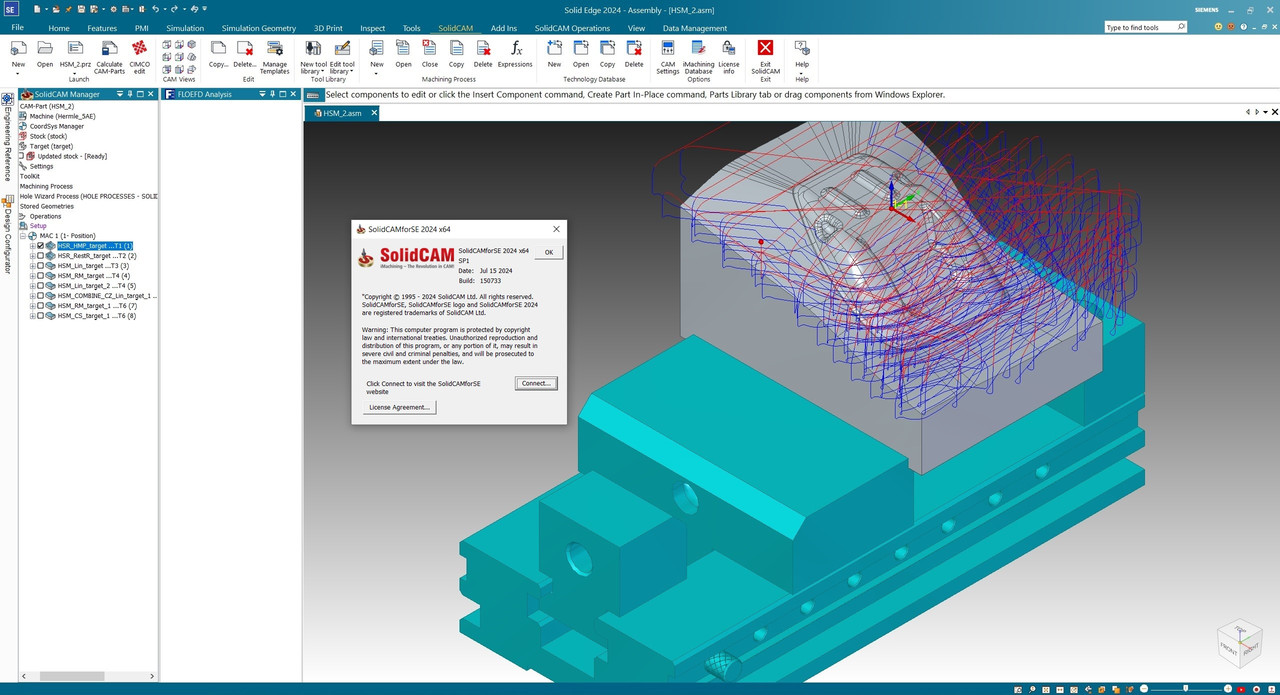
Download SolidCAM 2024 SP1 for Solid Edge 2020-2024 x64 full

Download SolidCAM 2024 SP1 for Solid Edge 2020-2024 x64 full

Link download SolidCAM 2024 SP1 for Solid Edge 2020-2024 win64

Working with SolidCAM 2024 SP1 Multilang for Solid Edge 2020-2024 full

Working with SolidCAM 2024 SP1 Multilang for Solid Edge 2020-2024 full

The Discharge: 64bit
Interface language: Multilingual
Chinese Simplified, Chinese Traditional, Czech, Danish, Dutch, English, French, German,Hebrew, Hungarian, Italian, Japanese,Korean, Polish,Portuguese, Russian, Spanish, Turkish
System requirements: pre-installed by Siemens Solid Edge 2020-2024
Description: SolidCAM 2024 SP1 for Solid Edge 2020-2024 is a game-changer in the CAD/CAM systems. Its diverse functionalities catering to 2.5-axis and 3-axis milling, multi-axis machining, turning, turning-milling, and EDM transforms the automation landscape in metalworking production. Reducing preparation time, enhancing program reliability, and ensuring optimal processing technologies empower manufacturers to excel in precision and efficiency. Its compatibility with Siemens Solid Edge further enhances its usability, cementing its position as an indispensable tool for the modern metalworking industry.
2.5-Axis Milling
It excels in 2.5-axis milling, providing remarkable precision and efficiency. It supports various processing strategies for contours, selections (including islands), grooves, and diverse hole processes like drilling, countersinking, and threading. The system’s capabilities extend to 2.5-coordinate processing of analytical surfaces.
3-Axis Milling
For products with intricate geometries, such as dies and molds, it offers an array of tools for 3-axis milling. The system supports diverse roughing and finishing strategies, including raster processing, equidistant processing, projection processing, and more. Moreover, it facilitates identifying and refining unprocessed areas from previous operations.
Multi-Axis Machining
It simplifies multi-axis machining on 4- and 5-axis centers. After placing the model in a user-defined processing plane, the system automatically calculates displacement and rotation parameters for part zero. This streamlines preparation and increases processing accuracy.
Turning and Turning-Milling
Its extensive toolset automates control program creation for turning and turning-milling. The system supports various tool types, enabling longitudinal turning, end facing, grooving, and more. Additionally, it handles both roughing and finishing of complex contours. Rotary tool support enables milling and drilling transitions on machining centers.
EDM (Electrical Discharge Machining)
Its wire EDM strategies handle external and internal contours with constant and variable inclination angles. It accommodates 4-axis processing and includes an algorithm to prevent processed material from falling. Users can exert control over physical parameters throughout the wire’s trajectory.
If you want to download SolidCAM 2024 SP1 for Solid Edge 2020-2024 full license, please click to DOWNLOAD symbol and complete check out a little help my website is maintained. The download link is appeared automatically when you complete check out.
CLICKDOWN.ORG Download CAD CAM CNC software
Please see youtube video for download instruction by open *.txt file and copy youtube video link paste to your browser If you don’t know how to download.
Inside folder SolidCAM 2024 SP1 for Solid Edge 2020-2024, already have crack’s file and instruction how to install SolidCAM 2024 SP1 for Solid Edge 2020-2024 step by step. I guarantee you can install SolidCAM 2024 SP1 for Solid Edge 2020-2024 successfully if you follow that instruction.
If you also can not install it or any problems, please contact to me by email: clickdown.org@gmail.com, then I will help you to install software by teamviewer.
Thanks a lot

SOFTWARES

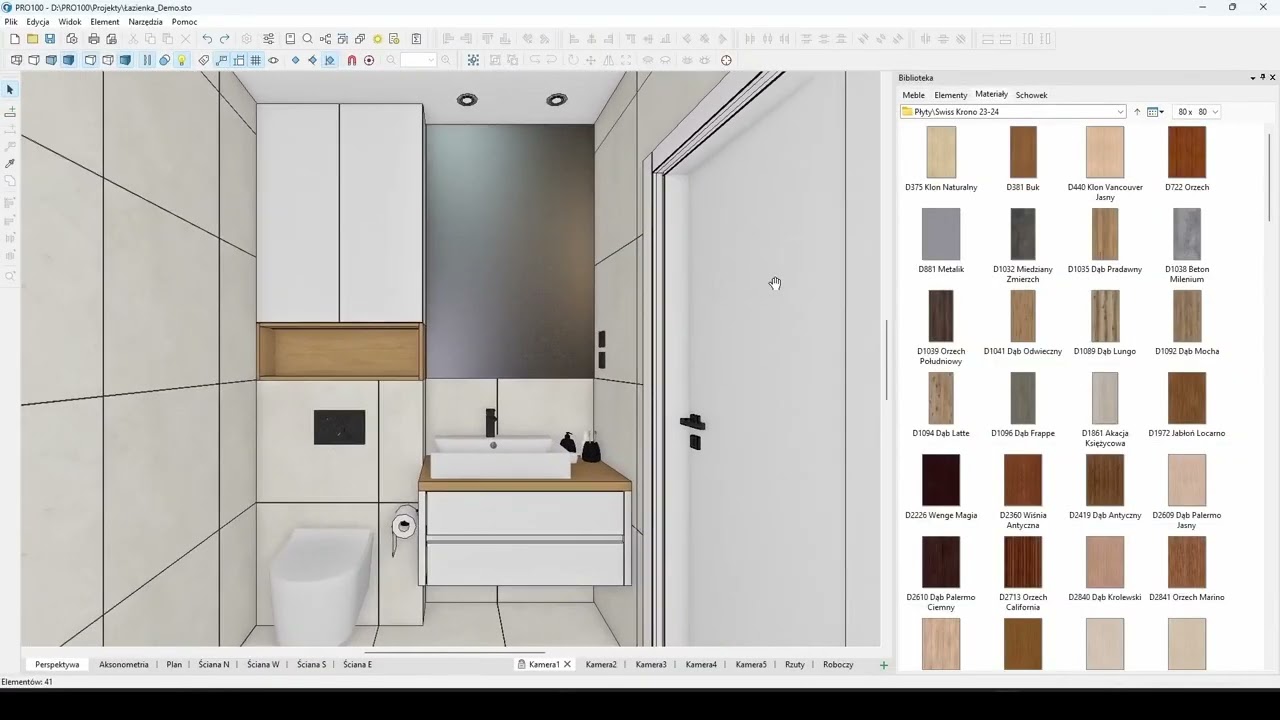
Download Pro100 7.05 x86 x64 full license 100% working

Download Pro100 7.05 x86 x64 full license 100% working

Link Pro100 7.05+ Nowy Rozkroj 7.45 + Kray + Plugins

Working with Pro100 7.05 full

Working with Pro100 7.05 full

The Discharge: 32bit, 64bit
Interface language: Multilingual

System requirements: operating system: Microsoft Windows Vista, Windows 7, Windows 8, Windows 10, Windows 10
graphic processor: high performance NVIDIA GeForce or AMD Radeon card eg. NVidia GeForce 960/970/980/1060/1070/1080
processor: Intel i5, 8 GB RAM or better
disk space: about 5 GB (depends on the catalogues, standard setup is about 3.5 GB)
The description: Pro100 7.05 is a simple and fast tool for visualization, cost calculation and detailed 3D project details. In PRO100, you can easily design a living space, choose any environment and experiment with color. The program includes extensive ready-made libraries of furniture and interior items. The ease of adding new materials will allow you to easily make any photo an element of the interior.
The installation
1) Run and install pro100-7-profi-net.exe library with the 6GB online downloaded
2) Run and install pro100-7-kray – visualization module
3) from the med folder to copy the file with replacement to the folder with the installed program
4) from the rus folder copy the file to the folder with the program and agree to the replacement
5) copy the plugins folder to the folder with the program, to request for replacement (if any) to select to skip (i.e. do not copy files with the replacement of those that are already there)
6) Nowy Rozkroj 7.45×32 folder copy to any place, create a shortcut for the run file rozkroj.exe and place in any convenient place
If you want to download Pro100 7.05 full license, please click to DOWNLOAD symbol and complete check out a little help my website is maintained. The download link is appeared automatically when you complete check out.
CLICKDOWN.ORG Download CAD CAM CNC software
Please see youtube video for download instruction by open *.txt file and copy youtube video link paste to your browser If you don’t know how to download.
Inside folder Pro100 7.05, already have crack’s file and instruction how to install Pro100 7.05 step by step. I guarantee you can install Pro100 7.05 successfully if you follow that instruction.
If you also can not install it or any problems, please contact to me by email: clickdown.org@gmail.com, then I will help you to install software by teamviewer.
Thanks a lot

SOFTWARES

Download STM32CubeProgrammer 2.16.0 x64 full license

Download STM32CubeProgrammer 2.16.0 x64 full license

Link download STM32CubeProgrammer 2.16.0 win64 full

STM32CubeProgrammer 2.16.0 x64 full

STM32CubeProgrammer 2.16.0 x64 full

Working-with-STM32-Cube-Programmer-2-16-0-full

Working with STM32CubeProgrammer 2.16.0 full

The Discharge: 64bit
Interface language: English

System requirements: Windows 10 and 11, 32 bits (x86) or 64 bits (x64)
Linux: Ubuntu LTS 20.04 and LTS 22.04, and Fedora 37
macOS 13 (Ventura), macOS 14 (Sonoma)
The description: STM32CubeProgrammer 2.16.0 (STM32CubeProg) is a universal software tool for multiple OS for STM32 products.
It provides an easy and efficient environment for reading, writing and verifying the device’s memory via debugging interface (JTAG and SWD) and the bootloader interface (UART, USB DFU, I2C, SPI and CAN).
STM32CubeProgrammer offers a wide range of features for programming the internal memory of STM32 (e.g. Flash, RAM and OTP), as well as external memory.
STM32CubeProgrammer also allows you to program and download options, check programming content and automate programming using scripts.
STM32CubeProgrammer is delivered in GUI versions (graphical user interface) and CLI (com command line interface).
All functions
Washes, programs, and checks the contents of the device’s flash memory.
It supports the Motorola S19, Intel HEX, ELF and binary formats.
Supports debugging and bootloader interfaces:
ST-LINK Debugging Tub (JTAG/SWD)
UART, USB DFU, I2C, SPI and CAN booters interfaces
Programs, erases and tests external memory devices with examples of external flash downloaders to help users develop loaders for specific external memory.
Automates STM32 programming (urin, check, programming, and option bytes)
Allows programming OTP memory
Supports programming and customization of additional bytes.
Offers a command-line interface for automation using scripts.
Update of firmware ST-LINK
Ensures secure firmware creation with the STM32 Trusted Package Creator tool.
Download and re-proof of peripherals of STM32MP1 series
Supports OTA programming for the STM32WB series.
Support for several OS: Windows, Linux, macOS
If you want to download STM32CubeProgrammer 2.16.0 full license, please click to DOWNLOAD symbol and complete check out a little help my website is maintained. The download link is appeared automatically when you complete check out.
CLICKDOWN.ORG Download CAD CAM CNC software
Please see youtube video for download instruction by open *.txt file and copy youtube video link paste to your browser If you don’t know how to download.
Inside folder STM32CubeProgrammer 2.16.0, already have crack’s file and instruction how to install STM32CubeProgrammer 2.16.0 step by step. I guarantee you can install STM32CubeProgrammer 2.16.0 successfully if you follow that instruction.
If you also can not install it or any problems, please contact to me by email: clickdown.org@gmail.com, then I will help you to install software by teamviewer.
Thanks a lot

SOFTWARES

Download STM32CubeIDE 1.15.0 x64 full license

Download STM32CubeIDE 1.15.0 x64 full license

Link download STM32CubeIDE 1.15.0 win64 full activated

STM32CubeIDE 1.15.0 x64 full

STM32CubeIDE 1.15.0 x64 full

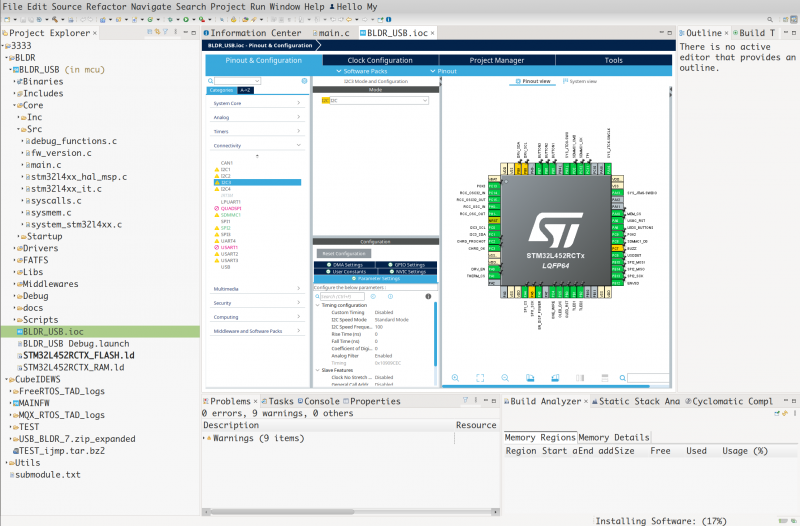
Working with STM32CubeIDE 1.15.0 full

Working with STM32CubeIDE 1.15.0 full

The Discharge: 64bit
Interface language: English

System requirements: Windows 10 and 11, 64 bits (x64)
Linux: Ubuntu LTS 20.04 and LTS 22.04, and Fedora 37
macOS 13 (Ventura), macOS 14 (Sonoma)
The description: STM32CubeIDE 1.15.0 is a versatile development tool for multiple OSs that is part of the STM32Cube software ecosystem.
STM32CubeIDE is an advanced C/C++ development platform with peripheral device configuration, code generation, code compilation and debugging for STM32 microcontrollers and microprocessors. It is based on the Eclipse/CDTTM platform and a GCC development toolkit and GDB debugging. It allows you to integrate hundreds of existing plugins that complement the capabilities of Eclipse IDE.
STM32CubeIDE combines the STM32 customization features and the creation of projects from STM32CubeMX, offering a versatile tool and saving time for installation and development. After selecting an empty MCU or MPU STM32 or a pre-configured microcontroller or microprocessor from the choice of board or selecting an example, a project is created and the initialization code is generated. At any point of development, the user can return to initialization and configuring peripherals or intermediate software and re-generating the initialization code without affecting the user code.
STM32CubeIDE includes build and stack analyzers that provide the user with useful information about the project status and memory requirements.
STM32CubeIDE also includes standard and advanced debugging functions, including viewing CBD kernel registers, memory and registers of peripherals, as well as real-time variable viewing, the Serial Wire Viewer interface, or fault analyzer.
All functions
Integration of STM32CubeMX services: STM32 microcontroller, microprocessor, development platform and selection of project example. Configuration of swinging, watch, peripheral and intermediate software. Creation of the project and generation of initialization code. Software and intermediate software supplemented by advanced STM32Cube extension packages.
Based on Eclipse/CDTTM, with Eclipse, with support for Eclipse, a GNU C/C++ tool set for Arm and the GDB debugger.
STM32MP1 Series: OpenSTLinux Project Support: Linux Support
Additional advanced debugging functions, including: representation of the CPU kernel, the register of peripherals and memory. View variables in real time. System analysis and real-time trace (SWV). CP fault analysis tool. Support for RTOS support, including Azure.
Support for ST-LINK (STMicroelectronics) and J-Link (SEGGER) punching support.
Import of the project from Atollica TrueSTUDIO and AC6 System Workbench for STM32 (SW4STM32)
Supports for multiple OSs: Windows, Linux and macOS, only 64-bit versions.
If you want to download STM32CubeIDE 1.15.0 full license, please click to DOWNLOAD symbol and complete check out a little help my website is maintained. The download link is appeared automatically when you complete check out.
CLICKDOWN.ORG Download CAD CAM CNC software
Please see youtube video for download instruction by open *.txt file and copy youtube video link paste to your browser If you don’t know how to download.
Inside folder STM32CubeIDE 1.15.0, already have crack’s file and instruction how to install STM32CubeIDE 1.15.0 step by step. I guarantee you can install STM32CubeIDE 1.15.0 successfully if you follow that instruction.
If you also can not install it or any problems, please contact to me by email: clickdown.org@gmail.com, then I will help you to install software by teamviewer.
Thanks a lot

error: Content is protected !!
Scroll to Top