symbolic math software

SOFTWARES

Download Maple Flow 2025.2 win64 full license forever

Maple Flow 2025.2 – Advanced Engineering Calculation & Documentation Software

Download Maple Flow 2025.2 x64 full license

Link download Maple Flow 2025.2 win64 full activated
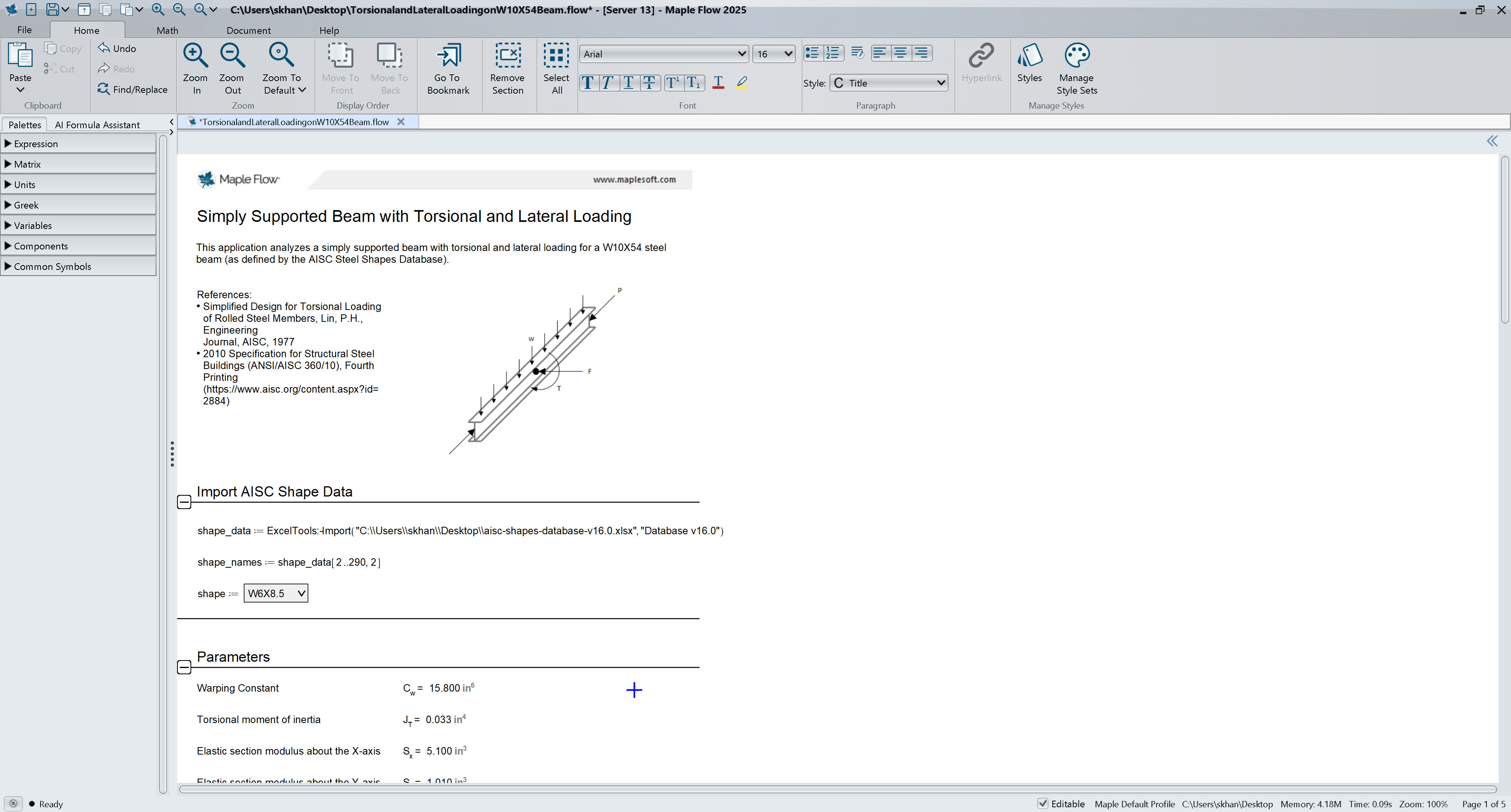
Description of Maple Flow 2025.2

Maple Flow 2025.2 is a modern engineering calculation and documentation tool developed by Maplesoft. Designed for engineers, scientists, and technical professionals, Maple Flow provides a flexible environment for performing mathematical calculations, solving engineering problems, and documenting workflows in a clear, structured format.

The 2025.2 release enhances performance, improves usability, and expands calculation capabilities, making it an efficient solution for technical documentation and analysis.

What is Maple Flow 2025.2?
Maple Flow is an intuitive calculation software that combines the power of advanced mathematics with a free-form worksheet interface. It allows users to enter mathematical expressions naturally, mix text with equations, and create organized engineering documents that are easy to read and share.

Unlike traditional spreadsheet tools, Maple Flow is built specifically for technical calculations, offering symbolic and numeric computation in one seamless workflow.

Features of Maple Flow 2025.2

1. Natural Math Input
Enter equations as written on paper
Automatic unit recognition and conversion
Real-time calculation updates
Clear step-by-step evaluation

2. Symbolic & Numeric Computation
Algebraic simplification
Equation solving
Calculus operations
Matrix and vector calculations

3. Engineering Units Management
Built-in unit handling system
Automatic dimensional analysis
Unit conversion tools
Error prevention for mismatched units

4. Structured Technical Documentation
Combine text, math, and images
Create professional engineering reports
Organized worksheet layout
Easy formatting tools

5. Performance & Usability Improvements
Faster calculation engine
Enhanced worksheet navigation
Improved stability
Optimized large document handling

6. Seamless Integration
Compatible with Maple ecosystem tools
Export to PDF and other formats
Collaboration-friendly document sharing
Supports modern engineering workflows

Benefits of Using Maple Flow 2025.2
Simplifies complex engineering calculations
Reduces risk of mathematical errors
Improves clarity in technical documentation
Enhances productivity for engineers
Supports structured problem-solving workflows
Saves time compared to traditional spreadsheets

Who Should Use Maple Flow?
Maple Flow 2025.2 is ideal for:
Mechanical engineers
Civil engineers
Electrical engineers
Scientists and researchers
Engineering students
Technical consultants
It is particularly valuable for professionals who require accurate calculations combined with clear documentation.

Conclusion
Maple Flow 2025.2 delivers a modern and intuitive platform for engineering calculations and technical documentation. With natural math input, robust symbolic computation, and integrated unit management, it provides engineers with a reliable tool for solving and documenting complex problems efficiently.

If you need a powerful yet easy-to-use engineering calculation software, Maple Flow 2025.2 is an excellent choice.

If you want to download Maple Flow 2025.2 full license, please click to DOWNLOAD button to download.
CLICKDOWN.ORG Download CAD CAM CNC software
Inside package Maple Flow 2025.2, already have cracked files and instruction how to install Maple Flow 2025.2 step by step. I guarantee you can install Maple Flow 2025.2 successfully if you follow that instruction.
If you also can’t install it or get any problems, please contact to me by email: clickdown.org@gmail.com, then I will help you to install software by teamviewer or Ultraviewer or Anydesk.
Thanks a lot

SOFTWARES

Download Maplesoft Maple 2025.2 x64 full license forever

Download Maplesoft Maple 2025.2 x64 full license forever

Link download Maplesoft Maple 2025.2 win64 full activated

Working with Maplesoft Maple 2025.2 full license

Description of Maplesoft Maple 2025.2

Maplesoft Maple 2025.2 is a powerful computational mathematics and symbolic analysis platform designed for engineers, scientists, educators, and researchers who require advanced problem-solving tools. This release enhances Maple’s core symbolic engine with improved algebraic manipulation, faster numeric solvers, and expanded support for modern mathematical functions. Its upgraded interface and workflow tools make mathematical modeling, simulation, and data analysis more streamlined and accurate.

Maple 2025.2 offers robust capabilities for symbolic computation, calculus, linear algebra, differential equations, statistics, and optimization. The system integrates an enhanced coding environment, improved data visualization tools, and expanded support for external programming languages. Users can build complex models, analyze large datasets, and generate high-quality plots and documents with precision and efficiency.

With improved performance across core mathematical operations, expanded import and export options, and enhanced teaching tools, Maple 2025.2 remains one of the leading platforms for academic research, engineering design, and advanced mathematical education.

Key Features of Maplesoft Maple 2025.2

Enhanced Symbolic Computation Engine
Improved algebraic simplification, differential equation solving, and symbolic integration for more accurate results.

Advanced Numeric Solvers
Faster numeric methods for optimization, differential equations, and large-scale computations.

Upgraded Visualization Tools
High-quality 2D and 3D plots, interactive animations, and better rendering for scientific presentations.

Improved Programming Environment
Enhanced Maple language editor, code completion, profiling tools, and debugging features for efficient development.

Data Analysis and Statistics Enhancements
New statistical functions, improved data import tools, and better handling of large datasets.

Machine Learning and AI Toolkits
Expanded libraries for regression, classification, clustering, and neural networks.

Documenting and Reporting Tools
Create professional worksheets, technical reports, and interactive documents with improved layout controls.

Engineering and Scientific Libraries
Updated toolboxes for physics, signal processing, control systems, and applied mathematics.

Interoperability Upgrades
Better integration with Python, MATLAB, Excel, and other external tools.

Performance Optimization
Significant speed improvements across symbolic manipulation, numeric computation, and graphical output.

Maple 2025.2
provides a comprehensive environment for exploring mathematics, building models, and performing advanced research with unmatched precision and reliability.

If you want to download Maplesoft Maple 2025.2 full license, please click to DOWNLOAD button to download.
CLICKDOWN.ORG Download CAD CAM CNC software
Inside package Maplesoft Maple 2025.2, already have cracked files and instruction how to install Maplesoft Maple 2025.2 step by step. I guarantee you can install Maplesoft Maple 2025.2 successfully if you follow that instruction.
If you also can’t install it or get any problems, please contact to me by email: clickdown.org@gmail.com, then I will help you to install software by teamviewer or Ultraviewer or Anydesk.
Thanks a lot

SOFTWARES

Download PTC Mathcad Prime 11.0.1.0 win64 full activated

Download PTC Mathcad Prime 11.0.1.0 win64 full activated

Link download PTC Mathcad Prime 11.0.1.0 x64 full 100% working

Working with PTC Mathcad Prime 11.0.1.0 full activated

Description of PTC Mathcad Prime 11.0.1.0

PTC Mathcad Prime 11.0.1.0 is a powerful engineering calculation software designed for professionals, researchers, and students who need a reliable platform to perform, document, and share complex mathematical computations. With its intuitive interface and advanced computational capabilities, Mathcad Prime allows users to solve equations, analyze data, and visualize results with ease. It bridges the gap between engineering design and documentation, making technical work both precise and accessible.

This release, Mathcad Prime 11.0.1.0, enhances performance, improves symbolic and numeric calculation accuracy, and expands integration with CAD software. It supports live mathematical notation, meaning equations look just as they would on paper, ensuring clear communication of engineering knowledge. Users can seamlessly combine text, units, equations, and graphs into a single worksheet for professional documentation.

Key Features of PTC Mathcad Prime 11.0.1.0

Intuitive interface for creating and editing mathematical worksheets.
Supports symbolic and numeric computation with high precision.
Live mathematical notation for professional engineering documentation.
Built-in unit management to ensure calculation accuracy.
Advanced plotting and visualization tools for data analysis.
Integration with CAD systems, including PTC Creo.
Enhanced equation-solving capabilities for algebra, calculus, and differential equations.
Rich library of predefined functions and engineering templates.
Improved collaboration features for sharing and reviewing worksheets.
Performance and stability enhancements in version 11.0.1.0.

Why Choose PTC Mathcad Prime 11.0.1.0

Mathcad Prime 11.0.1.0 is more than just a calculation tool; it is a complete platform for engineering documentation. Its combination of symbolic math, numeric analysis, unit management, and visualization ensures accurate, reliable, and professional results, making it indispensable for engineers, scientists, and educators.

If you want to download PTC Mathcad Prime 11.0.1.0 full license, please click to DOWNLOAD button to download.
CLICKDOWN.ORG Download CAD CAM CNC software
Inside package PTC Mathcad Prime 11.0.1.0, already have cracked files and instruction how to install PTC Mathcad Prime 11.0.1.0 step by step. I guarantee you can install PTC Mathcad Prime 11.0.1.0 successfully if you follow that instruction.
If you also can’t install it or get any problems, please contact to me by email: clickdown.org@gmail.com, then I will help you to install software by teamviewer or Ultraviewer or Anydesk.
Thanks a lot

error: Content is protected !!
Scroll to Top